
An Introduction to Web Scraping using Node.js and Cheerio
October 17, 2023
NodeJS
In today's digital age, the internet is an ocean of information. But often, the data we need isn't readily available in a convenient format. This is where web scraping comes in handy.
As a beginner developer, you might be wondering how you can start building your own web scraper. Well, have no fear because I'm here to guide you through the process of building your very first web scraper using Node.js and cheerio.
What is Web Scraping
First, let's define what web scraping is. It's the process of automatically extracting data from websites and storing it in a structured format. It's a useful tool for developers to gather information from different sources and use it for various purposes.
Some of its uses include:
- Market Research: Scraping e-commerce websites to gather pricing information and product details.
- Competitor Analysis: Extracting data from competitor websites to analyze their strategies and offerings.
- Content Aggregation: Collecting news articles, blog posts, or social media posts for content aggregation platforms.
- Lead Generation: Extracting contact information from business directories or social media profiles.
- Search Engine Indexing: Crawling web pages to index content for search engines like Google.
How To Build Your Own Web Scraper
Now, let's talk about the tools you'll need to build your web scraper. Node.js is a JavaScript runtime that allows you to run JavaScript on the server side. Cheerio is a JavaScript library that allows you to manipulate and traverse the DOM (Document Object Model) of a website. It works similar to jQuery and is used to extract the data you need from a website.
Prerequisites
Before we dive into web scraping, ensure you have Node.js installed on your system. You can download and install it from here.
Here's how you can build your first web scraper step-by-step:
Step 1: Install Node.js
Start by installing Node.js on your computer. You can download it from the official website and follow the installation instructions.
Step 2: Create a Project Folder
Open your terminal and navigate to your desired directory. Create a new folder for your project.
Step 3: Initialize a new Node.js project
Run the following command in your terminal to create a package.json file.
Step 4: Install Cheerio
Install the Cheerio library using npm.
Step 5: Create scraper.js File
Create a new file named scraper.js in your project folder.
Step 6: Require modules
In your scraper.js file, require the modules you'll need: cheerio and http or https.
// scraper.js
const https = require("https"); // or const http = require('http');
const cheerio = require("cheerio");
Step 7: Use the http or https module to make a request to the website you want to scrape.
For this example, I will be scraping panmacmillian.com to get the best Fantasy Books of 2023.
// URL of the website to scrape
const url =
  "https://www.panmacmillan.com/blogs/science-fiction-and-fantasy/best-new-fantasy-books";

// Make a GET request to fetch the HTML content of the website
https.get(url, (response) => {
  let data = "";

  // A chunk of data has been received.
  response.on("data", (chunk) => {
    data += chunk;
  });

  // The whole response has been received. Process the data.
  response
    .on("end", () => {})
    .on("error", (error) => {
      console.log("Error fetching data:", error);
    });
});
Step 7: Using cheerio
Use the cheerio module to load the HTML from the website and select the elements you want to scrape. I already went ahead to inspect the HTML tags and classes of the elements I wanted to scrape. You can also read the cheerio documentation to find out more ways to select elements and traverse the DOM to use it.
- Use the
.text()or.attr()method to extract the data from the selected elements. - Use the
console.log()function to print the data to the console.
// The whole response has been received. Process the data.
response.on("end", () => {
  // Load HTML content into Cheerio
  const $ = cheerio.load(data);

  //Create an array to store title info
  const titles = [];

  // Select the elements you want to scrape
  $("figure").each((i, el) => {
    //Loop through each 'figure element'
    const title = $(el).find("h3 a").text(); //Get each title
    const author = $(el).find("h4 a").text(); //Get each author

    // If both title and author are not empty, add to titles array
    if (title !== "" && author !== "") {
      titles.push({ title, author });
    }
  });

  // Print the scraped data

  titles.map((title) => {
    console.log(`${title.title} by ${title.author}`);
  });
});
Here's an example of what your scraper.js file might look like:
// scraper.js
const https = require("https"); // or const https = require('https');
const cheerio = require("cheerio");

// URL of the website to scrape
const url =
  "https://www.panmacmillan.com/blogs/science-fiction-and-fantasy/best-new-fantasy-books";

// Make a GET request to fetch the HTML content of the website
https
  .get(url, (response) => {
    let data = "";

    // A chunk of data has been received.
    response.on("data", (chunk) => {
      data += chunk;
    });

    // The whole response has been received. Process the data.
    response.on("end", () => {
      // Load HTML content into Cheerio
      const $ = cheerio.load(data);
      //Create an array to store title info
      const titles = [];

      // Select the elements you want to scrape
      $("figure").each((i, el) => {
        //Loop through each 'figure element'
        const title = $(el).find("h3 a").text(); //Get each title
        const author = $(el).find("h4 a").text(); //Get each author

        // If both title and author are not empty, add to titles array
        if (title !== "" && author !== "") {
          titles.push({ title, author });
        }
      });
       // Print the scraped data

      titles.map((title) => {
        console.log(`${title.title} by ${title.author}`);
      });
    });
  })
  .on("error", (error) => {
    console.log("Error fetching data:", error);
  });
And here's the result in my console:
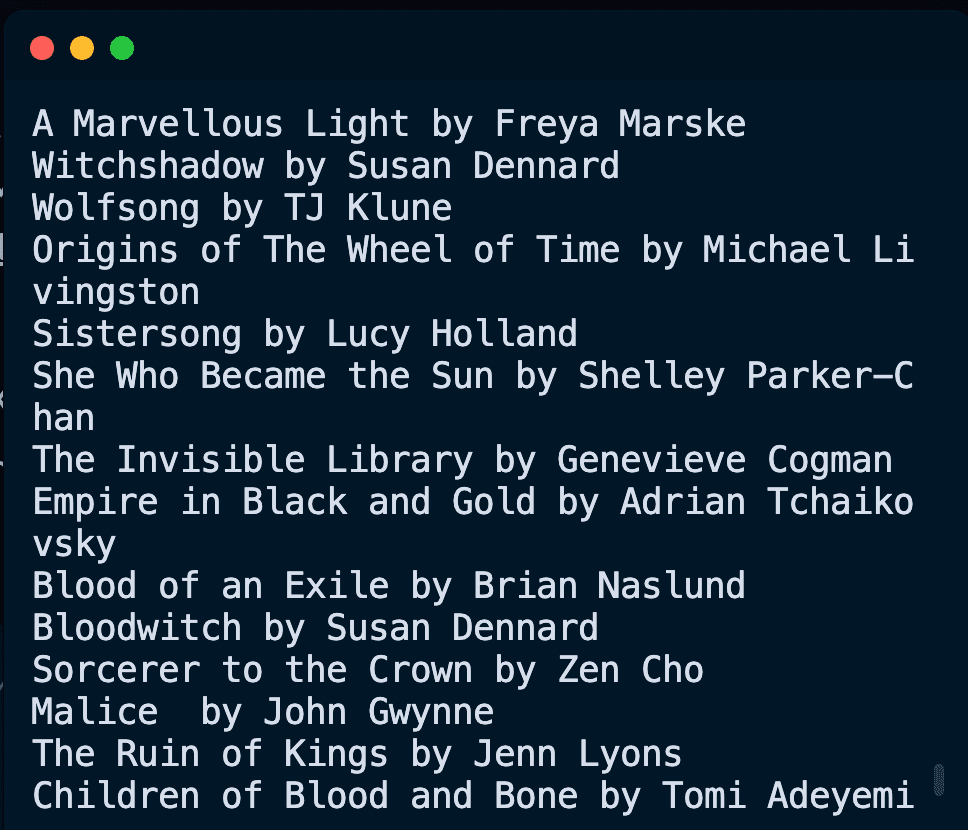
With this, you have built your first web scraper! You can now use this as a starting point to scrape more complex websites and extract more data. However, it is also essential to understand the legal implications and respect the terms of service of the websites you scrape.
Of course, web scraping can get complicated, but as you continue to learn and practice, you'll be able to handle more complex scraping scenarios.
Happy scraping!